
By Lee Rickwood
It still depends on what you are editing.
Several years ago, VideoUniversity published Doug Graham’s excellent article, What’s the Best Editing System? And while lots of technology has changed, the basic answer that Doug put forth back then still holds true today ”“ the answer, he said, is ”˜What do you want to do with it?”
With all the choices for video editing hardware and software out there, you are still best served before making a purchase decision to ask yourself a bunch of questions- then, go ask the dealer or vendor. Ask yourself what your goals are for video editing, and what you hope to accomplish.
Are you a hobbyist who wants to make better home movies? That will point you in one direction. Do you want to go a step further, and start a video business, producing business videos, or perhaps legal videos? These goals lead to other answers. And if you are aiming high, with broadcast TV or documentary film festivals in your target, well, that’s another answer ”“ and probably a few more dollars.
Ed Note: This is amazing PC editing software at a
ridiculously low price. I use it and swear by it.
Each of these video scenarios, as Doug first pointed out, has a different set of video requirements ”“ both in terms of the equipment most suited for the job, and in terms of the skills most required to make best use of the gear you choose.
Your choice will be some combination of hardware and software. The hardware is a computer and accessories such as extra storage drives and maybe a ”˜capture card’. Software is a dedicated program for editing video, much like a program for word processing. Some editing systems are complete hardware and software packages making them dedicated editing appliances, such as those from MacroSystems, like the Kron or Casablanca, or even the NewTek Toaster system.
Square One
Another question to ask is how computer literate or tech savvy are you? The answer will steer you one way or the other. Mac users getting into video will find it pretty easy to get started ”“ most of what they need is built right into their computer. The hardware needed, in this case, is some sort of DV or FireWire capture card that brings video into the computer, and the software, like iMovie, which is usually included with a new purchase.
And while there are now PC makers, VARs and integrators who will pre-install a DV capture card or build an entire turnkey system for you, some Windows PC users will find they have to add their own (in my case, it was a card and software bundle from Canopus) DV capture card to the system, one that’s compatible with the computer, with the editing software being used, and with your needs and abilities.
Even at the beginner level, there are an amazing number of choices out there – capture cards used to get video from your camera to your computer can be found starting at $30. At the other side of the scale are really high-end cards that can cost thousands. Canopus, Matrox, Pinnacle, Digital Rapids, Aja and Blackmagic are among the many capture card makers out there.
The more pre-configured a video editing system is, the more expensive it will be. If time is money, and for many small business operators, that is the case, spending a little more up front may save you time, frustration and money down the line. In general, too, more expensive systems run faster. You can get going quicker on them, and they have the horsepower to do the job at hand faster, getting your final product ”˜out the door’ in less time.
The less expensive a system is, the more time it will take to get running the way it’s supposed to (and the more add-ons you may have to get later on). You are the one who will have to work out potential computer bugs and system incompatibilities, so assess your tech comfort level carefully.
Buy or Build?
As Doug originally wrote, “The extra money you spend in getting a turnkey system is well worth the extra time it takes to build and debug your own.”
Knowing that there are very capable and very confident folks out there, and some great home-made editing systems as well, you should again make your own best assessment here.
As many who have built their own editing system will advise, keep cool! That means not only having patience and long fuse, but also plenty of space and good fans for the PC interior. There is a lot of heat built up during many of the horsepower-intensive digital video editing processes ”“ you don’t want a meltdown ”“ for yourself, or your PC!
Hardware
One approach to computer hardware specs is to ignore the maximum ratings, and watch carefully the minimum. For example, a hard drive rated at a minimum spin speed of 5400 rpm is probably too slow for your needs. Video storage drives generally need 7200 RPM. Don’t worry about a computer’s peak transfer rate ”“ a sexy number in some cases, but for video, look for a good sustained throughput.
Some systems come with two or four GB of RAM ”“ but consider that, at the minimum, even the operating system may need that much. So, think about doubling or tripling the RAM to get the best performance from a system built to edit.
A single CPU processor chip, no matter how high its rating, will generally not be as good as a computer with multiple processors ”“ the advantages of Quad Core processing for video editing are pretty big, no matter the clock speed rating number.
One number you will want as high as possible is storage capacity. You will use up whatever space you have, I can guarantee it! Get more storage!
We used to talk about needing one gigabyte of storage space for five minutes of video. This amounts to about 13 gigabytes of hard drive space for an hour of DV or HDV video. Newer high definition formats need even more space, in some cases, over 500 gigabytes per hour of video! Yikes!
So get a dedicated, high capacity drive. Never use the computer’s internal system drive for video storage. You may even want several drives for storing video. Consider putting them in a type of RAID array or SCSI chain that can protect against data loss while actually speeding up edit time.
And don’t forget the fan to prevent overheating the computer. All the processing and drive spinning can generate a lot of internal heat, and that heat can negatively affect your computer and your editing experience. Big towers or PC cases can also help with cooling, even if they do not fit ”˜on the desktop’.
Speaking of available real estate, if you intend to do a lot of editing on longer shows or documentaries, consider a pair of large LCDs on which to work, not just one computer monitor. The added screen space will help a great deal in seeing and navigating the user interface of an editing program.
Software
There’s a certain comfort level you will want with the look and feel and design of a software program’s user interface, too. This is not just about your eyes; it’s about efficient, effective and creative workflows. You will be spending hours staring at the user interface, so make sure you like it and that you can find your way around it reasonably quickly.
There’s not necessarily a wrong or a right here ”“ something like overall color scheme will be an individual preference (and they may be customizable in some editing packages) but just how the screen is laid out, and how quickly you can find the specific editing tools you need while looking at that screen, are important personal points to consider.
So, you should get a hands-on demonstration of various video systems and software packages.
Generally, this means going to a video equipment dealer or vendor, but it can also mean checking out your friend’s or acquaintance’s video system. Check your nearest local video association. It’s a good idea to to attend a nearby video trade show, where there are bound to be several demos available. Try online searching for a dedicated user group on a certain editing program.
And take a ”˜test spin’ whenever possible ”“ at a dealer’s shop, if necessary, but also look on the Web for those 30 day free trial offers. This is a partial list of free demo software. These may not be the full sticker price software programs that they let you download for free, but they should be enough to help your assessment.
Here are some points to look at and compare:
Ease of Use
No matter what level of video editing you wish to do, the process generally requires you to make multiple decisions, and to choose multiple commands. These should be easy to find, easy to read, easy to use. One or two clicks should make an edit. Don’t be satisfied if it takes several clicks and menus to do one basic task.
Video Capture / Playback Compatibility
More on this later, but for now match your current camera or anticipated recording format to the edit system you are looking at. Make sure they are compatible ”˜on the way in’. Today, good video editing systems will work with several sources, like DV/AVCHD/miniDV camcorders, or VCRs, DVDs and even TVs. Just make sure it matches your needs.
Likewise, if you want to view your final edited program on something special, like a DVD or Blu-ray, an iPhone or iPad or Internet stream, make sure the edit system is compatible on the ”˜way back out’ too.
Specific Editing Tools
Video editing systems will use one of two main approaches to editing on screen ”“ the timeline and the storyboard. Some editing programs do both (Corel, Cyberlink, NewTek, Premiere among them) but if you are a fan of one or the other, it can influence your decision.
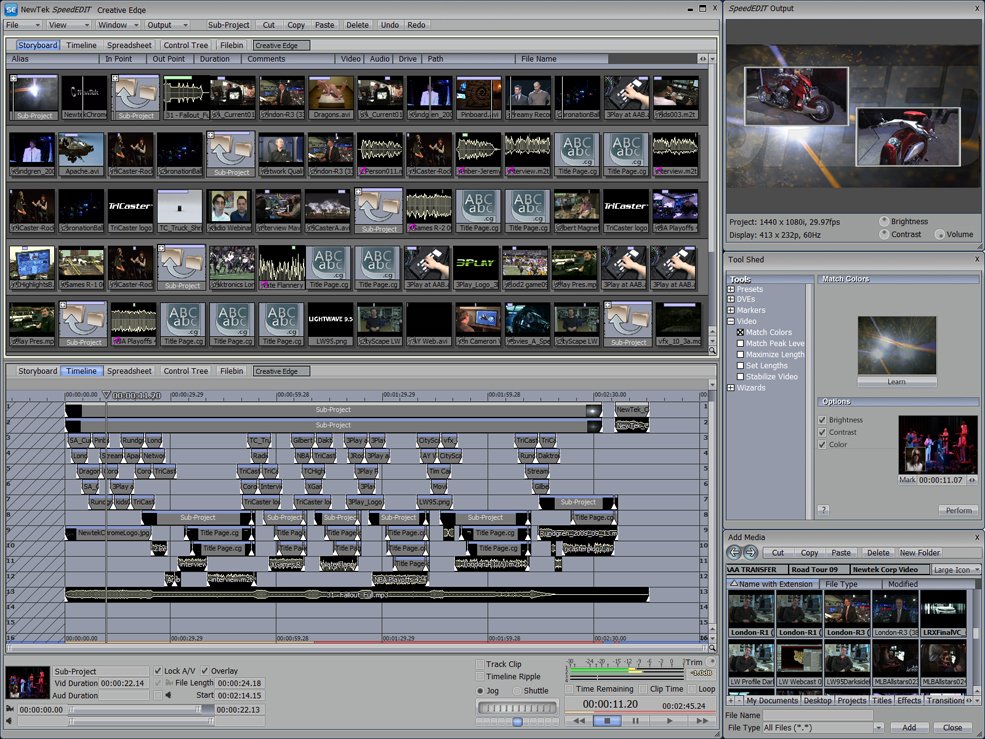
The storyboard is like a newspaper comic strip. It generally consists of small, square, on-screen icons or thumbnail pictures that represent individual video clips. You can grab these icons and drag and drop them around the computer screen to rearrange your program sequence in a simple, straightforward manner.
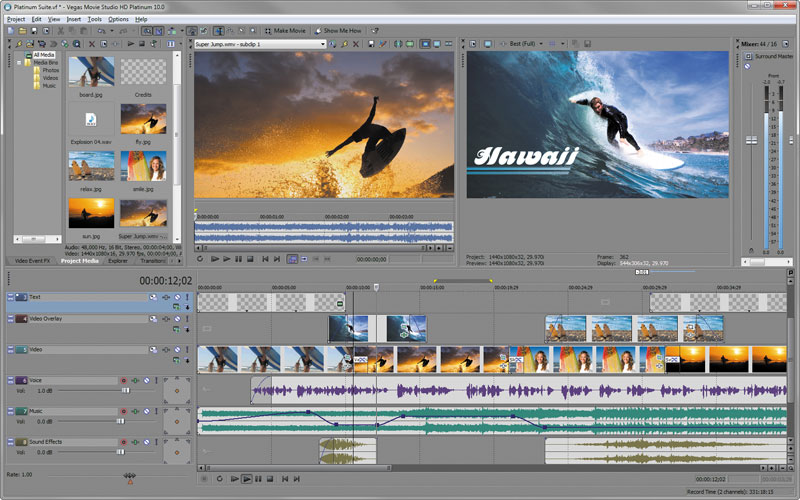
The timeline is a side-to-side linear representation of a program, often using colored boxes to represent individual video clips. Timelines can generally show a much longer program running length, and they can also show multiple tracks for both audio and video. Dragging and dropping those colored boxes on the timeline is one way to edit (and you should be able to put little pictures from the video clip into the colored box, as a helpful reminder).
Basic editing commands like capture or record video, cut and paste video clips, and so on are pretty standard, no matter what the system.
But more specific editing tasks (like slightly trimming a clip, starting a picture before its sound or vice versa, or even adding simple titles on screen) are features that start to separate one system from another. The more sophisticated editing systems will help you correct for bad lighting, different aspect ratios, even different video qualities, but these will be features found in more expensive systems.
More than simple straight cuts between video scenes, it’s important that a system allows you to add special transition or video effects. Many programs out there today come with an entire library of effects, or filters, or transitions, all designed to give your video ”˜a certain look.’
And while a library of built-in effects is nice, you might find that better still is a more powerful program that lets you create, or customize your own effects (and then save them for later use). Don’t forget to assess and compare the audio and photo editing tools inside a video editing program. Good audio, in fact, can make or break a good video, so don’t shrug it off. Control over volume, panning, EQ and other aural aspects is good to have, as is precise edit ability with both spoken words and music tracks.
The Dreaded ”˜R’ Word – Render
Today’s editing programs require powerful computers to handle the amount of video and effects processing. Not that long ago, most video editing was called ”˜render intensive’, and almost everything we tried to do took extra computer processing time ”“ create a special effect, then grab a coffee while it renders!
Today we have faster processors and more of them. But now we’re trying to work with uncompressed HD video in some cases, so rendering and processing speed can still be an issue.
Some editing systems that claim ”˜real time’ capabilities may actually mean what they say, but be aware that some claims are highly qualified ”“ it depends on the type and quality of video, the type and intensity of edit process, and particularly the type and specification of the host computer and CPU.
If you are planning to edit HD videos laden with special effects, you will need more power and your edit will take longer. But if you are only doing straight cuts between basic captured video scenes, the requirements for the best editing system will be much less.
Output/Export Capabilities
Good editing programs will let you tweak your program to your heart’s content ”“ or to your client’s budget says stop! But once you’ve finished, you have to get the edited program out of the computer and onto some viewing or screening format. These days, a lot of videos go straight to YouTube. Some editing programs list YouTube as a user selectable choice, right in the main menu. Flash video, MPEG-1 or maybe 4, even AVI or WMV (Windows) or MOV (Apple QuickTime) are handy and popular video formats, and they should be part of a good editing program’s export choices.
For output to discs, an MPEG-2 and or Blu-ray format choice is crucial. Note that some editing programs do have DVD authoring tools built in, but again, depending on your needs, you may want a dedicated DVD program with more capabilities.
Help/Documentation/Tech Support
For any software, especially more complicated video editing programs, good documentation and various avenues for Help is important. Look at built-in or online Help tools and tutorials, and find out about online support from tech department or user communities.
Wrapping Up
Taking another cue from Doug Graham’s original article, I am not going to tell you which edit system is “the best” for you. As you have read, that really depends on you, and what you need to do with the system. But among your choices will be products from companies like those listed below, all of which have several different products to offer, and many happy editors who are using them.
Most Popular Editing Programs
Apple (MAC)
From its entry level iMovie editing software, running on an iMac or iBook, up to the top of the line Final Cut Pro Suite running on a multi-processor tower, with Final Cut Express in between, Apple has editing packages that meet just about every need. Nice is the fact that Apple makes the hardware and the software.
Adobe (MAC/WIN)
From the lite version of its editing program Premiere Elements, to the full up big brother, Premiere CS Production Suite, Adobe has a range of software products and price points for video editing. The software runs on Windows or Macintosh PCs
Avid (MAC/WIN)
Avid Media Composer is a powerful SD and HD professional video editor for Mac or Windows. Media Composer (now v 5.5) is Avid’s top video editing program, but the company (owners of Pinnacle) also offers less expensive more consumer-oriented editing software.
Sony (WIN)
Vegas Pro, now v 17, is Sony’s comprehensive video editing software for Windows PCs (and its own VAIO laptops), designed for professional audio and video production, as well as DVD and Blu-ray Disc authoring. Sony’s Movie Studio Pro has nearly all the feature of its big brother, Vegas Pro, at 20% of the cost. Even Sony Vegas Movie Studio, for less than $40 is seen as an amazing value for video editing.
Digital Video Storage Requirements
This chart shows some of the hard drive space requirements for each hour of digital video being stored. The higher the video quality, the more storage space is needed. Other media assets, of course, take space, too. Generally, audio files for a video edit do not need much space, but building and saving special effects or heavy composites does.
(GB = gigabytes)
Format Number of GB per Hour of Footage
approx.
DV 13
HDV 720p 11
HDV 1080i 13
DVCPro HD60
XDCAM EX 20
ProRes 422 1920×1080 66
ProRes 422 HQ 1920×1080 100
Cineform Low36
Cineform High58
Lee Rickwood is an accomplished freelance writer/editor and award-winning independent media producer, based in Toronto.
The Art of Film and Video Editing takes you beyond the hardware to the art of editing. This 9-part article is comprehensive course in the art and styles of editing. Don’t miss it. It includes videos.



Great article–good for those getting started in the business and seasoned pros. I’ve used several systems and by far the best is Avid Xpress DV–no longer available, but students can still get it.
As far as choosing the best one, it’s a challenge–so many brands, features, etc. Best to try some out and pick the one that suits your needs.
mm…its usefull information, but as for capturing video I use Macvide ScreenCap
Great article. This should be a mandatory article for any beginner videographer.
Very Good article, i agree. I believe one of the easiest forms of video editing still around is and will always be free “VirtualDub”
The original version of this article was written by Doug Graham. It included excellent information, but had become dated. This new version of the article by Lee Rickwood pays homage to the older article while giving us current information.
Our sincere thanks to both Doug and Lee.
I wonder how much the upcoming Final Cut update will shake up the editing world. Rumor has it that it will take advantage of those 8 core machines and minimize the dreaded “R”…no more long renders.
XDCam EX footage need 16GB on NTFS and 14GB on Mac formatted drives, not 20. A 16GB SXS stick records one hour. In the XDCam EX “light” codec it can even record almost two hours.
Best,
Jakob
I thought maybe the software that put together “The King’s Speech” might be a good mention. It’s called Lightworks and it’s price is going to leave you speechless… $0 it’s free! seriously…
(Ed Note: http://www.lightworksbeta.com/ is open source editing software that was indeed used in the making of The King’s Speech.)
please advice: my system: 1.86 GHz, duo core, 1gig ram, 80 gig hard drive; i loaded pinnacle 14 but struggle to use it; what’s wrong – system or software?
please help?
I could not find the answer to my question on yuour website info page.
I am running windows 7 also 16 gig ram,quad core, 6 terrabits of storage , my question is I am using Pinnacle 14 Ultimate program, what would be the best video card for my system.
I’ve looked through several programs. I’m a still photographer that has two nice Sony Handycams and want to learn a bit about editing video. I have several programs here, but none of them give me the ability to see frame-by-frame as the old versions of Adobe Premiere used to do. Corel shows you frame-by-frame in a special box, but then no way to trim unless you break it into pieces. No razor.
I’ve two very nice PC’s that I can use for editing, and virtually limitless external storage. One tower has 8GB ram and quad core, the one IBM notebook is a W701 and has 16GB of Ram and solid state C, dual quad cores, and again, almost unlimited external USB 3 drives.
If someone could help me, or at least tell me how to see frame by frame and EDIT (sometimes it is only a few frames that I want to take out, I would appreciate it. I’ve been reading all of the manuals and articles I could find.
The latest Sony HandyCam is a NEX-VG10. It is not professional but it is good for what I use it for, and good to learn with.
My Nikon’s are professional DSL with video capability. I want to start learning this facet that I have completely overlooked. I’ve the hardware here…now to pick apart how I want to use the software. The programs I have here are Vegas Pro 10, Adobe Premiere, Adobe Premiere Elements, Roxio, AVS4You, Corel (newest) and Power Director. Right now I’m going to take a look at Final Cut.
Help much appreciated.
Hi Kate,
Sony Vegas should do everything you want including frame by frame and cutting precise frames. All the good programs have a steep learning curve. I’d try it again before you jump into another program.
Hal
Hi Hal and Kate.
I am home video taker. I have video on everything from VHS to super 8 to dat to mini dvd to dvd. I to am wanting to be able to cut and splice my home movies. For example, one side of the family doesn’t care about the family reunion of the other side. I’ve gone thru 4 programs, wasting time and money to the point of utter frustration.
I simply wanted to be able to import from my DVD or VHS player or sony mini-dvd camera onto my hard drive. Then edit the film depending on whom I am sending it to and finally burning it back to a DVD so I can mail it.
Kate, If you are trying the Sony Vegas and can leave some feedback it will be much appreciated. I’m thinking of the $99 on sale atm for $94 looks like the best choice for home movies. If Hal is correct that it allows you to edit down to frame by frame then it might be what I need.
Dee
Dee,
You will need player for each type of video you have. The player is hooked into a DVD recorder or
something like that. Then you can import the video into your computer and edit it.
If the Super 8 is film rather than video, you need to send that out to someone in your area. In fact, I would look for someone who does video transfers in your area. Have them transfer it all to a data DVD and then you could import that and edit it.
Trying to do all of this yourself is not worth it unless you are starting a transfer business.
Hal
@martin
You are trying to run it on a calculator.
Try a 3GHz proccessor, Intel i5/i7 Duo or Quad Core, 6GB RAM (more reccomended) and at least 1 or 2TB HDD space. Then you could run pretty much any video editing software with full HD video with no problems. 🙂
I built a system for my son (Intel Xeon 8-core, 3.33GHz, 6GB, Windows 7 64-bit) and I happen to have Adobe Premier Pro CS5 (64-bit) as part of the Adobe Master CS5 collection I purchased a few months ago. I heard he was using Sony Vegas Pro, how does the two compare? I just don’t want to spend a few hundred dollars more on Vegas Pro if I have a good editing app already on hand he can probably use. Any advice?
They are both great editing programs that should work very well on your new computer. They both have significant learning curves. Let him edit with Premiere and see how it goes.
I just built (with help) a new video editing system. I documented the parts and the process in our blog at:
https://www.videouniversity.com/my-new-editing-computer/
I hope you find this helpful.
Hi there,
I make quite a bit of video editing and want to expand my knowledge in terms of After Effects and heavy color correction. I make a lot of music videos and short movies, with complicated timelines.
I work on a Mac Pro 2 x 2.4 quad core intel xeon at work with 6gb of ram and ATI Radeon HD 5770, and my goodness is it slow on effects.
I’m now torn between a very powerful PC or the new 27inch iMacs with i7 processor, 16 gb ram and the AMD Radeon HD 6970M 2GB GDDR5.
Will this Mac be much more powerful than what I am running at the moment? And am I better off getting a PC for effect-intensive editing? The stats of the PC are
i7 Quad Core Processor i7-3770 with 16 gig ram
240GB INTEL® 330 SERIES SSD with another TB hard drive on the side
2GB NVIDIA GEFORCE GTX 560 Ti –
I know the new iMacs have thunderbolt capability but will that really change all that much? And how will it change it?
Thanks a lot for all your advice!
Ludovic – Your current unit is decent, but recommend you go to the Adobe’s Users Forum for After Affects & Premier to discover how to register your NIVIDA card in a file that Adobe uses to recognize your GPU. Only certain NIVIDA GPUs are approved by Adobe, but with this file registry one can add additional GPU models. NIVIDA’s GTX680 is approved for Premier (as well as NIVIDA’s 2000,4000,5000,6000 models). But GPUs are only effective to improve rendering in Premier’s Mercury Engine. This forum also discusses AE render times for different computer configurations. For After Effects, you really need a Dual Processor system (XEONs with 6 to 8 cores each) with as much RAM as you can afford to get to improve AE’s render times. The next improvement step is get least one fast RAID drive for your source media. I use two Promise Pegasus R6s (as RAID-5s) for both source and rendered media. But my MacBookPro i7 is still challenged in rendering After Affects projects as it is all done in the processor(s) cores & the amount of RAM memory assigned to each core.
If you had a budget of $40K, what would be your ULTIMATE video studio? This is actually for a school assignment. Thanks!!!
Hey guys, Is it possible/ideal to use a Dell PowerEdge 1950 server with 2x Quad Core Xeon 2.33Ghz 16GB RAM on a windows 7 (using Vmware xsi) ? since this server has a 16mb vga card.. is it possible to upgrade the server’s graphics card to a more powerfull one using the built in PCI-e slots? ..
Does the server has inputs for keyboard, mouse, and monitor? If so, the answer is yes, but it would be an unusual way to use a server.
The typical way to plan this is to start with the software and build a computer around that. The editing application will have requirements that you will want to follow.
Here’s how I built my editing computer
https://www.videouniversity.com/my-new-editing-computer/
Good info! Should we use a mix of SDD + Hdd. Because to have 2 ssd of 1TB is very expensive for video editing!
Many people use a fast SSD to handle programs and operating system and then use HDD for the editing files and clips. That is a cost-effective way to go. If you have the budget, two SSDs are great, but not necessary.