Subscribe to Our Newsletter

Email Address:
* Required

First Name:

Last Name:

Subscribe

Unsubscribe


Satisfied Customers

NOWHERE have I found more comprehensive, nuts and bolts information that clearly explains the inner workings of the business as your course does.

Jerry Bullard

Accolades

Forbes Magazine calls VideoUniversity one of the best business-to-business sites for digital video production.


Forbes Magazine Award


Winner... Videography Magazine's "Website of the Month" Award


Winner... PC Magazine Online "Best Desktop Video Site" Award


Winner... CyberFilm School's "FOUR STAR" Award

Search For Video Gear on Amazon

Ebay Search Camcorders DSLRs and More

Feb 28

Aerial Cinematography With Model Helicopters Gets A Big Boost
posted in: production

Aerial Video By Philip (Frogman) Hinkle

Philip (Frogman) Hinkle, a long-standing member of the VideoUniversity Forums, has been flying remote-controlled aircraft and shooting aerial videos for a couple years. Philip says the video above led that company to hire him to film corporate training classes as well as video tours of all of their 20 locations (some including aerial video). Way to go, Philip!

This growing field has just received a boost from a new federal law. The law compels the Federal Aviation Administration to allow unmanned aerial vehicles known as drones to be used for all sorts of commercial endeavors — from selling real estate and dusting crops, to monitoring oil spills and wildlife, even shooting Hollywood films. They may look like overgrown toy airplanes and helicopters, but add a camera and a skilled operator and these aircraft can capture moving video like nothing else.

Aerial cinematographers are not the only ones to benefit from the new law. Local police and emergency services will also be permitted to send up their own drones.

For more information see this NY Times Article and NY Times Video.

These aerial vehicles don’t all cost a fortune. Here’s a Drone Quadricopter with video camera for less than $300.

Keep in mind that remote flying drones are very dangerous and can seriously hurt people and property. Know what you’re doing and do it safely. Check your insurance policy.

Feb 24

Get Free Marketing and PR on TV, Print, & more.


By: Anthony Burokas

When it comes to getting exposure for your company, you can buy print ads, buy online ads, buy postcards & mailers, buy a table at a local event show, and after a while, you will see people start to get to know you and your brand. But what if you could leverage the power and reach of local TV airtime without having to pay for it? That would be pretty darn valuable.

Video University regular Bill Grant recently posted about his Tie The Knot Tips videos in the Video University Forums (membership required). I took a few minutes to speak with him about how he started the video series, what the return on his investment is, and how others can start doing the same thing in their local market.

First, let’s take a look at one of his segments:

Now, you’ll note that not only does he not specifically promote himself and his company as producers of the video segment, he includes his competitors. Other segments about Florists, Photographers, Catering, Staging, etc do not have any reference to Bill Grant or his company Cinema Coture at all.

So what’s the premise and how does it pay off?

It all started when Bill wanted to develop a closer networking relationship with a local event planner that targeted the same high level of clients that CinemaCoture served. A local agency guy that Bill had worked  before was now an anchor on the local morning news show. Seeing an opportunity to connect the dots, Bill approached the planner with the basic concept of a “tips” show for brides. Once she was on board, Bill approached his contact at the station.

Tying The Knot Tips host Melanie Murphy.

The key motivations for the station are: they have a 3-4 hour morning show that they have to fill with entertaining and useful content for their viewers. Offering them something like a bridal tips video package – for free – gives them great content that they can use without any additional cost. It is easier to get your video accepted by the station in smaller markets, than in larger ones, like LA, NYC, etc. Also, it really helps to have a polished package- front to back, audio, music, title & closing bumpers, etc. But don’t put lower 3rd graphics on the people- the station will want to do that so the titles are uniform with the rest of the show.

Bill worked out an initial 10 ideas with the wedding planner and proceeded to make calls to local vendors in each of these categories to have them offer advice to brides. These are typically shot at the Planner’s studio, but Bill also visits other vendors who are too pressed for time to come in to the studio. For each segment, Bill says it typically takes about an hour to shoot, and then an hour to cut and post the segment. Then he can upload a 720p MPEG-2 file directly to the station’s FTP server and they take it from there.

Return On Investment:
How has this paid off? Bill says that his bookings and referrals are up. Now, it’s hard to say whether this is due specifically due to the video series, or other economic and industry factors, but he hopes it continues. One thing that has definitely increased is his connection with event vendors. After each episode that airs, many vendors that weren’t interviewed for the segment call in and ask why not, and how they can be involved in the future. So people are indeed watching, and vendors in industry are more aware of Cinema Coture now than before the video segments started airing.

If I feature two caterers or two florists in a show then every other florist feels “well, why not me?” It’s been an interesting situation we’ve created. We’ve basically set up a thing that the vendors want to get involved in. It’s a side-effect that we didn’t necessarily intend.

Other returns on the investment are less tangible. It’s promoting the value of video in general and provides an information service which is likely to grow mindshare over time. It could be parlayed into new business through local Chambers of Commerce- showing how local businesses are using video to tell their story. But the primary benefit is for the industry that Tie The Knot Tips serves:

I think our industry as a whole lacks a validity in the bride’s eyes so if you connect what we do- like short form- with all those necessary vendors out there, we become one of those … with the associations that we have with them, we’re now in the conversation. And that helps the visibility of what we do. I think a lot of brides don’t want the “old style” video. They want something new and stylish that matches up with their photography and what type of event they’re planning to do. If they can see videographers associated with these other categories, it puts us in the same mind. 

A polished, animated open and close really help to sell the segment.

Make the package complete, and polished, so the stations can easily air it.

Moving Forward:

The video segments will continue on the TV station. But now there are plans to extend the information to other media. Local newspapers, especially free ones, are always looking for useful, local, and free content. Taking the information from the video and converting it to text, and editing it so it flows, creates a useful article that reaches a whole new market. Lastly, the videos will reside on a new TieTheKnotTips.com blog that will also include other information for brides. “There’s no end to what’s possible if you understand how to take advantage of local markets.” But don’t stop there. What about reaching out beyond your city, region, state… out to the country, and even beyond:

All of these options are out there. The tips are universal- we made sure of that, in case we wanted to do a national blog or show, we weren’t going to localize it too much. That possibility is certainly out there and, of course, there’s no reason to start a project like this without thinking as big as you can. And shoot for as big as you can go and see how far you can take it. 

Every local market has several network stations. If they have a big local morning news show, they need content. Produce one segment as a test-bed, sample and make it available online. Call in to the station manager and talk to a producer about supplying a segment like this. Send them an e-mail with a link to your sample. Make it clean and easy for the station to pick up and use with minimal effort on their side. If they want it, then you have the commitment for distribution. Getting local vendors involved is generally pretty easy because they all would welcome some free air time on local TV.


In the business for 20 years? He doesn't look it. Anthony Burokas is a 20+ year broadcast TV video producer currently based in Dallas TX. He has produced an extensive body of event, corporate, special interest, and broadcast TV. His web site is IEBA.com
Feb 19

Local SEO For Your Video Business

Local Search Business Strategy

How does your website rank in local searches? If you are offering video services such as weddings, duplication, transfers, corporate videos or others, your customers must be able to find you in a Google search such as “wedding video Podunk, Iowa” or “DVD duplication Toronto” or “business video, Arlington, KS.” Local search is all that matters.

You may be surprised to learn that most brides do not use the word videographer. Instead they use “wedding video Podunk Iowa” or some such. But don’t take anyone’s word on this. Sign up for Google Analytics www.google.com/analytics/ and you will see what actual search words people are using to find your website.

Here’s what one successful videographer says:

After studying my web stats and Google Analytics, I concluded that brides are searching the area first and then what they are looking for. So in my area they are searching for Harrisburg Wedding Video. (city has been changed) I am #1 in the Google search results against some big players in the Harrisburg region.

The exact words of the search are very important as well. They weren’t looking for more than one video, so don’t uses the plural “videos”. They aren’t looking for a videographer, a cinematographer, or a video journalist. If you want top Google results use the word “video.”

So you should use YourCity Wedding Video as much as possible on your website. It’s important to use this phrase in a sentence. If you use it too many times in other ways but not in a sentence, Google sees it as keyword stuffing and will penalize your website in Google searches.

Content is the key. Lots of quality words, videos, and links. Link to other vendors. Get a blog and blog often.

You don’t have to come up on the first page of overall searches. Your clients want to hire a local producer, not a long distance producer. So it’s better to come up first in those searches for “wedding video” or “Corporate Video Production” in your town, region, state or zip code. Here’s an article that will help you win this game of local searches. http://www.videouniversity.com/articles/optimizing-for-local-search

Spend time following the directions in this article. This can make a big difference for your business.

Feb 15

Back Up Early & Often
posted in: Anthony Burokas

By: Anthony Burokas

Soon, 100 MBps for flash media will be "slow"

We live in a “fast” society. I laugh every time I see the new AT&T 4G LTE ads on television with the two guys at the football game- who are so far ahead of everyone else because of their super-fast mobile broadband… “you guys know how to post VIDEOS to Facebook?” That’s soooo 23 seconds ago.

Flash media now rules the roost with digital cameras. We want edit systems with native file handling, no transcoding, accelerated H.264 compression and megafast upload speeds for delivery.

But what do we archive all our media?

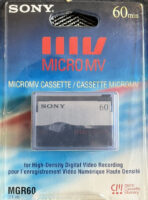
Drive connect standards seem to change every couple years, SCSI, then IDE, then ATA, then SATA. Did you save a backup of your source files onto external Syquest or Bernoulli drives? Then 1.4 MB “floppy?” Then super huge (at the time) Zip drive? Then Jazz drive? Then to external CD-R disks? Then DVD-R disks? … It used to be that you could save the camera tapes for the original footage, but in the age of flash media, the cards get reused quickly. Nobody is going to put a $650 64GB P2 card on the shelf as an archive. The footage moves down the chain like water down the stream. But where does it end up? Where do you put it to archive it?

This tape, from 30 years ago, still plays fine.

I recently had an exchange with a fellow producer and he related this story to me:

My 31 year old 1″ type C played fine a couple of months ago on my $113 BVH 3000. I was surprised how good it looked.

Now, I’ll try to spring for a different break out box for my client’s aja card that allows for composite in. Will transfer it to a hard drive. The footage was from a stillborn doc. Might be able to sell it to the principals in it for their use.

Do you trust optical media for your archives? I don't.

I have DVD-R disks that were unplayable in less than 5 years. Fellow producers were hampered by CD-Rs that were unreadable in less than 10 years. Hard disk drive interfaces change regularly. What format will you store your media on so it plays back in 30 years? The answer is that you have to keep moving it forward & updating it. It is an ongoing process, not something you set & forget.

I have a special interest video series where the music was composed in Mark of the Unicorn’s “Performer” and saved on 3.5″ “floppies.” MoTU still makes this music software and the original music files can be updated. But it took some doing to find a 1.4 MB floppy drive to transfer the music project files. I still had an old Mac OS-9 laptop that could read the old disks. So I borrowed a Sony USB floppy drive to copy the files to a USB stick. But the second floppy wouldn’t read. I had a hunch it was an 800k floppy and reached out to some compatriots who I thought might be able to help me.

To make things even MORE difficult, it turns out that my PTPro’s floppy drive does not work after all. I had one more old computer to fall back to and it was the one that worked. I have an old Power Computing PowerBase which has a working HDD floppy drive. After reconnecting the Mac SE’s HD to it, I was finally able to make an HDD floppy for you, this time on OS 8.6.

In case you had forgotten (I had), you can’t make a disk copy (clone) of an 800k disk onto a 1.4MB floppy. You have to simply copy the files themselves from one disk to the other. So that’s what I did. Both the original disk and the HDD disk are packaged and will soon be mailed back to you.

I now have all my original Performer files and I am currently looking for composer/musicians who can help me update the files with new voices so the music sounds fresh and polished for today— not limited by what was available 16 years ago.

So check your “archives” now. Load those disks. Try to read/copy the media to current drive technologies. Because old formats don’t die, they just stop working without telling you. Plus, you may not feel your source material is so valuable right now, but it may be very valuable 10, 20 or so years from now.


In the business for 20 years? He doesn't look it. Anthony Burokas is a 20+ year broadcast TV video producer currently based in Dallas TX. He has produced an extensive body of event, corporate, special interest, and broadcast TV. His web site is IEBA.com
Feb 08

So Much Better Than Wireless Mics
posted in: Anthony Burokas

By: Anthony Burokas

Sony's WRR-862 ReceiverThe Tascam DR-100

Two things happened recently to quite nearly cement the death of wireless microphone audio for much event and corporate video in America. First, the FCC reallocated the 700 Mhz spectrum to new services. Any wireless microphones on those frequencies, while they still work fine, are now illegal to use, and are subject to more interference – possibly ruining your audio at any moment.

Second, was a new wave of DSLRs being used to shoot video. In the early years of DSLRs there was no way to get audio in the camera, and there was no way to monitor the audio the camera was recording. So the vast majority of videographers who moved to DSLRs to shoot video also moved to what is called “double system” sound- where a second, audio only recorder is used to record audio.

Both of these events hastened a mass migration away from wireless microphones. And here’s what’s happened:

When you consider that these two developments occurred at the same time, you’ll see that a lot of people were looking for new audio solutions. This was the perfect opportunity to change from being limited to 2-tracks in the camera, to using as many audio recorders as you wish to deploy…

The Zoom H4N


  • I can have a mic for the main speaker – use a small recorder with a lav mic.
  • I can have a mic for the host to hear them well wherever he or she may wander
  • I can use a recorder’s built-in stereo mics for the string quartet or any music that is played on site
  • I connect another small recorder for a board feed, if available, to get all the different sources- and any I might not have envisioned setting up before the event. Otherwise it can be used as a backup or ambient mic, or maybe even just to put it in front of the speaker if the person running audio won’t give me a feed.
  • I can drop small recorders with lav mics at the podiums to get clean, clear audio without needing the main board feed, or hold them as backups.
  • Lastly, a small stereo recorder sits on my camera to record sound in ambient situations. I will also use it to record the signal from my wireless (if I use it) and use the output of the recorder to feed my cam for a sync track.

Once you get to the studio you sync them up and edit away. You will have lots of audio tracks, but that is a good thing and there are several software options for easily syncing the audio tracks up in the timeline.

The wireless system is still quite useful for much smaller gigs, like corporate work where just one person is speaking to the camera. But wireless audio, even though you can monitor it in the camera while recording, doesn’t mean it will always be good. You can get wireless “hits” as people move around and interference from other radio transmissions. Sometimes, for instance at receptions, someone turns on another wireless mic in another room which conflicts with your wireless. Then you have to waste time finding a clear frequency and changing your gear. Portable recorders have none of these issues.

You can have all the tracks you need with multiple recorders.


No video camera could record all these disparate sources unless you had a crew of audio technicians like Robert Altman had for the making of “Nashville” . When I mix the final result together, it is like being there- perhaps even better. If someone with a weak voice does a reading at the podium, I’m not tying to hear her through all the echo & reverberation in the church. I have the mic I placed at the podium and I can crank that up till she’s just as loud as everyone else. In this case my audio is BETTER than being there.

Of course, when the organ kicks in for the recessional, the audio recorders’ auto limiters are put to good use. But some new recorders can even be set to record a second stereo track some 20 db down from the main set to ensure that you have a clean feed. This is also useful for the board mix in case the volunteer working the mixer does not understand what good audio levels are.

So take a good look at your wireless mics, and how you do audio, and see if there isn’t an alternative that gives you better audio, more choices, and avoids any wireless issues.

In the business for 20 years? He doesn't look it. Anthony Burokas is a 20+ year broadcast TV video producer currently based in Dallas TX. He has produced an extensive body of event, corporate, special interest, and broadcast TV. His web site is IEBA.com
Feb 02

Making Your Old CCD Camcorder Continue to Pay Off
posted in: Anthony Burokas

By Anthony Burokas
I’m a gear guy and I have HD gear. Yes, even my phone shoots HD now. But does that mean SD gear is dead? Not at all.

The best kind of money to make is on projects that require no new investment. Because if you’re constantly paying off new gear then you’re not making as much money as you could. So where and how do you use SD gear in the age of HD?

Live from the show floor.

I was hired in January of 2012 to run camera for the local chamber of commerce’s annual awards gala. This is a typical, multi-camera, live, IMAG (image magnification) event, with b-roll played back from DVD players to highlight each of the winners. Why not do it in HD? Consider the delivery. The IMAG screens were 10′ screens flown way above the audience. They were 30-40′ away, at a minimum. Most people would watch the screen across the room so they’d be about 100′ away give or take.  The human eye can only resolve so much detail (and the vast majority of the Chamber membership is older individuals) so putting HD on such a small screen so far away would be worthless endeavor. You could probably count on one hand the number of people there that night who could actually perceive it.


The company that was hired for the gig already owns SD gear. Doing it in HD would require renting HD gear from cameras to delivery. By going with SD gear, there’s zero rental cost so all the revenue goes in the pocket. They all work with gear they know. They use the equipment they have and, even despite numerous last minute changes and client additions/deletions, the event goes off flawlessly with many compliments on the coverage and the video playback.

SD all the way to delivery to the hockey parents. They buy this gladly.

The same goes for sporting events. Kids hockey, cheerleading and more. Parents want instant gratification. So would your money be better spent buying new HD gear, or in a fast DVD rack that can quickly duplicate a master DVD you record live during the event. In the time it takes for the kids to change from back into “street clothes,” you have finished DVD’s waiting for the parents to take home at $45 a pop. That makes parents/customers very happy and dramatically lowers your delivery costs.

A sample corporate web interface, with the video delivered smaller than 1/4 frame SD.

How about corporate work. Everything is HD, right? Not really. I spent 5 years working for Merck, one of the largest pharmaceutical companies and for every webcast, even the SD image was sized down to fit the field representative’s laptop screen. On the right of the interface was a live chat, at the bottom were other interface elements- all fitting into 15 or 12″ laptop screens. All the powerpoint presentations were still formatted square to fit the delivery so widescreen video would have been out of place. HD resolutions need not apply.

Did the drummer use "bendy" drumsticks? No. The camera used CMOS chips.

Then consider another advantage of early HDV gear- CCD chips. There’s no rolling shutter, no flash banding, no image distortion. I just finished a corporate video where I shot 1080p24 and conformed to 720p24 so I could do image stabilization in post (the vDSLR lenses I used didn’t offer it) This “windowing” is a great little trick, if it werent’ for the jello I had to contend with after the image was stabilized. The shot may be smooth and even, but the “rolling” shutter was still evident within the frame as various parts jiggled around independent of the stable overall frame. Take particular note of the Magnavox shots. Using my Sony FX1 HDV camcorder with 3 CCD chips would have made this video look a lot better.

So, when considering gear, think of the deliver, think of the need, and re-look at how your existing gear may provide what you need.


In the business for 20 years? He doesn't look it. Anthony Burokas is a 20+ year broadcast TV video producer currently based in Dallas TX. He has produced an extensive body of event, corporate, special interest, and broadcast TV. His web site is IEBA.com